
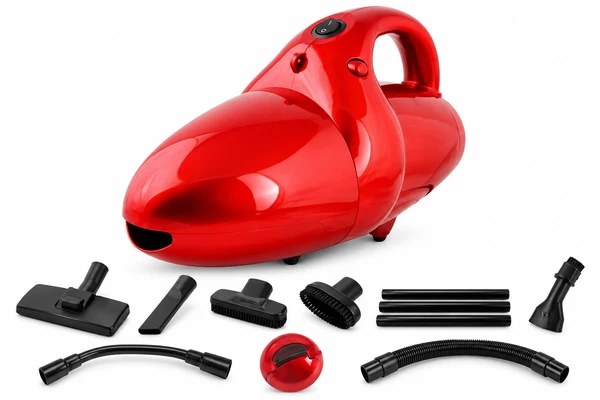
Vacuum Cleaner with Suction & Blow Fuction VTL-1020
VTL-1020
Skyline 1000W Vacuum Cleaner with Suction & Blow Function | Powerful Cleaning for Home & Office
- Versatile Attachments
- Low Noise Operation
- Easy To Use
- Easy Maintenance
- Energy Efficient
Product Features
Experience efficient and versatile cleaning with the Skyline Vacuum Cleaner, featuring a powerful 1000W motor and dual suction and blow functions. Perfect for tackling dirt, dust, and debris, this vacuum cleaner is designed to keep your home and office spotless with ease.
- Dual Functionality: Offers both suction and blow functions for comprehensive cleaning.
- High Power Motor: 1000W motor delivers strong suction power for efficient dirt removal.
- Compact & Lightweight: Easy to maneuver and store, making it perfect for everyday use.
- Easy-to-Clean Dust Bag: Removable dust bag allows for hassle-free emptying and cleaning.
- Versatile Attachments: Comes with a variety of nozzles and accessories for different cleaning tasks.

Specifications
- Model
- VTL-1020
- Power
- 1000 W
- Product detail
- Dual Functionality
- Product detail
- Multi Surface Cleaning
- Power
- Powerful Suction
- Dimensions
- 15.6W x 14.2H CM
- Weight
- 0.65 Kg
What's in the Box
Vacuum Cleaner with Suction & Blow Fuction VTL-1020 VTL-1020
For the complete list of supplied components and accessories for this model, please confirm with Skyline before ordering.
Warranty
- Comprehensive Coverage: Comes with a 1-year warranty covering any manufacturing defects or issues.
- Customer Support: Dedicated customer service team available to assist with any queries or concerns.
- Hassle-Free Returns: Easy and convenient return policy for a worry-free purchase.
Downloads
Product files & support
Find model-specific resources and request a manual or product demonstration through My Skyline.
Use & Care
Troubleshooting Guidelines for Vacuum Cleaner
- Not Turning On:
- Ensure the power cord is securely plugged into a working outlet.
- Check and replace the fuse or reset the circuit breaker.
- Ensure the power switch is in the "ON" position.
- Reduced Suction Power:
- Clear clogs in the hose or filters; clean/replace filters.
- Empty the dust bag or canister.
- Unusual Noise:
- Check and clear obstructions in the hose, nozzle, or brush.
- Tighten loose components.
- Brush Roller Not Spinning:
- Remove debris from the brush roller.
- Replace a worn or broken belt.
- Overheating:
- Empty the dust bag/canister and clear blockages.
- Let the vacuum cool after prolonged use.
- Loss of Power Mid-Use:
- Allow the vacuum to cool if the safety shut-off activates.
- Inspect the power cord for damage.
- Bad Odor:
- Wash or replace filters.
- Empty and clean the bag or canister.
- Use a vacuum deodorizer.
- Nozzle or Attachments Not Working:
- Ensure attachments are connected properly.
- Clear blockages in attachments or the hose.
- Spitting Out Dust:
- Reinstall the bag or canister securely.
- Replace damaged filters or seals.
- Burning Smell from Motor:
- Turn off and unplug the vacuum immediately.
- Check for belt jams or motor issues; seek professional help.
General Maintenance Tips:
- Clean or replace filters regularly.
- Check for blockages after each use.
- Inspect the power cord for wear and tear.
- Store in a dry, cool place.
Refer to the user manual for detailed instructions and warranty. Contact support for assistance.
Related Vacuum Cleaners
View all Vacuum Cleaners


Find your everyday fit
Choose Your
Skyline Vacuum Cleaners
Explore the range and find a model for your routine.
Explore Vacuum CleanersFrequently Asked Questions
Where can I find the specifications for VTL-1020?
Open the Specifications tab above for this model's listed details, or contact Skyline if you need help choosing a product.
How do I place a bulk enquiry?
Use Send Bulk Enquiry above to send your requirements for VTL-1020. Skyline can help with quantities and product availability.
Where can I get a manual or product assistance?
Visit My Skyline and select VTL-1020 to find product resources or request help. For service assistance, use the customer support portal. Open My Skyline
Where can I check warranty information?
The Warranty tab contains the warranty information currently listed for this model. Refer to the supplied warranty documentation for the applicable terms.
